Videos without search engine optimisation are like a great product without a shop window. Someone needs to find your video before they can watch it. That’s exactly what video SEO is about and in 2026, the playing field has changed fundamentally.
What Is Video SEO?
Video SEO encompasses all measures with which you make videos findable for search engines. The goal: your video appears when someone searches for a relevant topic on YouTube, on Google or in AI-generated search responses.
A few figures show why this is important:
Videos on a website increase the chance of appearing on the first Google page by a factor of 53. Over 25% of all Google search results today contain a video element. Ignoring video SEO means missing out on one of the biggest organic growth levers there is.
Video SEO 2026: What Has Changed
It used to be almost exclusively about YouTube rankings. Then Google Video SEO came along. Today, AI-powered search tools such as Google AI Overviews, ChatGPT and Perplexity have been added – they summarize video content directly in their answers and cite well-optimized videos as sources.
This means that a well-optimized video not only appears in searches, it is also cited by AI systems as a trustworthy source. This is a new dimension of visibility.
The Three Platforms That Matter
YouTube YouTube passed the 2.85 billion monthly active users mark in 2025 and is now the second largest search engine in the world. If you don’t have a presence there, you are missing out on enormous potential.
Google 23% of all Google search results now show video content. Videos appear in carousels, rich snippets and, more recently, in AI overviews – often before the first organic text results.
AI search tools ChatGPT, Perplexity and Google’s own AI are increasingly analyzing transcripts, descriptions and structured data. Videos that provide clear answers to specific questions are cited as a source.
Video SEO on YouTube: What Really Counts
Title The title is the most important lever for click rate and ranking. It should contain the main keyword, answer a specific question or promise a clear benefit. The optimum is 8 to 15 words. Instead of “Video SEO tips”, better: “Video SEO 2026: 7 measures that will really improve your ranking”.
Description The description explains to YouTube and Google what the video is about. At least 200 words, with naturally embedded keywords, a clear summary of the content and links to your own website. Timestamps for individual chapters in the video also help with ranking in Google.
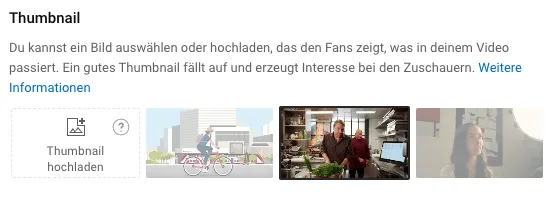
Thumbnail The thumbnail decides whether someone clicks or not. It is the first thing a user sees, even before the title. Clear faces, strong contrasts and little text work best. A/B testing is worthwhile.
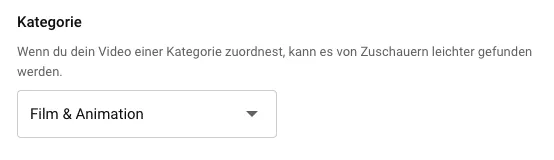
Tags and Categories Tags help YouTube to categorize the context of the video. 4 to 6 content-related tags and 4 to 5 brand-related tags are a good guideline. The right category ensures that the video is displayed in relevant search queries.
Watch Time and Engagement YouTube’s algorithm prioritizes viewer satisfaction – i.e. watch time, click-through rate, audience retention, likes, comments and shares. Technical optimization is useless if the video is not captivating.
Transcript and Subtitles Today, subtitles are standard, not optional. They make videos accessible, increase dwell time and help YouTube and Google to better understand the content. AI tools now create transcripts in minutes – there’s no excuse not to use them.
Video SEO on Your Own Website
If you only upload videos to YouTube and do not embed them on your own website, you are giving away traffic.
Schema Markup Structured data helps Google to index your video correctly and display it as a rich snippet. The VideoObject schema is the standard for this. If you use WordPress and Yoast Video SEO, this is largely automatic.
Video Sitemap A video sitemap informs Google about all videos on your website – title, description, thumbnail URL, duration. Without a sitemap, Google will simply never crawl some of your videos.
Embedding and Load Time Videos should be integrated via YouTube or Vimeo, not as a direct file. This reduces server performance and ensures that the player works on all devices. Responsive integration (16:9 on desktop, 9:16 on mobile) is mandatory.
Using Dwell Time A video on the website keeps visitors on the page for longer. This is a positive signal to Google: this page provides added value. Especially on landing pages and product pages, a well-placed explainer video is a direct SEO lever.
Video SEO and AI Search: The New Factor
Since April 2025, Google has been testing AI Overview Video Carousels, which directly display relevant sections from videos in the search results. Videos with clear chapters and timestamps have a direct advantage.
What this means in practice: Structure your video into clearly named chapters. Answer specific questions directly and precisely. The more clearly the content is structured, the more likely your video will appear in AI-generated answers.
Video SEO and Explainer Videos: A Powerful Combination
Explainer videos are particularly suitable for video SEO. They answer specific questions, have a clear structure and appeal to a defined target group – exactly what search engines reward.
A well-produced explanatory video on a product page not only improves the dwell time, but can also appear directly in the Google search results as a video snippet. This doubles the visibility for the same keyword.
We will show you how to use an explainer video strategically for SEO in a free initial consultation.
Conclusion
Video SEO is no longer a nice-to-have. If you produce videos and don’t optimize them, you’re giving away most of their impact. The good news: with the right measures and consistent implementation, organic visibility on YouTube, Google and in AI search responses is now more achievable than ever before.
Checklist: Video SEO at a Glance
YouTube
- Keyword in title (8-15 words)
- Description min. 200 words with keywords and links
- Test thumbnails (A/B testing)
- Set chapter with timestamps
- Relevant tags (approx. 8-10)
- Select the correct category
- Activate subtitles
Website
- Embed video (YouTube/Vimeo player)
- VideoObject Schema Markup
- Create video sitemap
- Optimize page for mobile
Contents
- Answering specific questions from the target group
- Clear structure, quick access
- High watch time thanks to good content

Arrange a free consultation with our video experts. Together we simplify your communication.
Photo Credits: Firmbee.com, PhotoMIX Company